





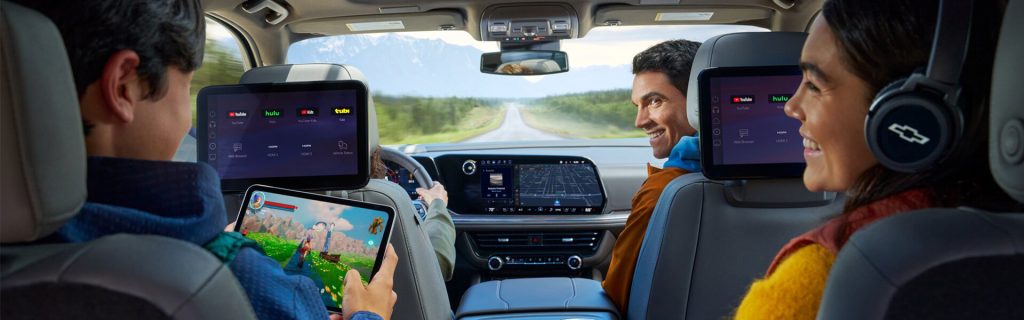
Technology should make your drive easier, not more complicated. That is one reason modern Chevrolet vehicles focus on practical tools drivers can use every day. From smartphone connectivity to helpful camera views, many Chevy technology features are designed to support commuting, parking, towing, family travel, and longer drives across Mississippi.
At Kirk Brothers Chevrolet of Vicksburg, shoppers can compare Chevrolet models with technology that fits the way they actually drive. Whether you are looking at a Silverado 1500, Equinox, Traverse, Trailblazer, Trax, Tahoe, or another Chevy model, the right features can make your next vehicle feel more comfortable and easier to use.
A Chevrolet Infotainment System Built Around Daily Use
A Chevrolet infotainment system should feel simple during the moments you use it most. That may include pulling up directions, answering a call, choosing music, checking vehicle settings, or using connected apps from the center display.
Many Chevrolet models offer touchscreen displays that place key controls within easy reach. Instead of digging through confusing menus, drivers can use a central screen to access audio, phone settings, navigation features, and available vehicle apps.
That matters during normal driving around Vicksburg. If you are heading to work, taking kids to practice, running errands, or driving toward Jackson or Tallulah, a clear infotainment setup can make the cabin feel more organized.
Smartphone Connectivity That Feels Familiar
One of the most useful Chevy technology features is smartphone connectivity. Many drivers already rely on their phones for directions, calls, messages, music, and podcasts. Chevrolet helps bring those familiar tools into the vehicle through available smartphone integration.
Depending on the model and equipment, drivers may be able to use Apple CarPlay or Android Auto compatibility to access supported phone features through the vehicle display. That can make everyday driving feel more natural because the apps and layouts are already familiar.
This is especially useful for commuters and families. You can start a route, make a hands-free call, or keep entertainment ready for a longer drive without constantly reaching for your phone.
Google Built-In and Connected Convenience
Some Chevrolet vehicles offer Google built-in, which can bring helpful Google apps and services directly into the vehicle’s center display. That may include access to Google Assistant, Google Maps, and other supported apps through the infotainment system.
For many drivers, this type of connected technology makes navigation and voice control feel more convenient. Instead of relying only on your phone, you can use built-in tools designed to work with the vehicle’s display and controls.
This can be helpful when you are traveling outside your usual routine. If you are driving from Vicksburg to another part of Mississippi, heading out on a road trip, or simply looking for a faster route, connected navigation can make the trip feel easier to manage.
Touchscreens That Help Keep Controls Clear
A good touchscreen is not just about size. It is about how easy the system is to read and use while parked or safely stopped. Chevrolet touchscreens often help organize common features in one place, which can reduce clutter inside the cabin.
Depending on the vehicle, shoppers may find large center displays, driver information screens, and customizable settings. These tools can help show important information without making the cabin feel overloaded.
For example, an SUV shopper may care about navigation and media controls for family travel. A truck shopper may care more about trailering information, camera views, or vehicle settings. The right display can support both needs in different ways.
Available Camera Views for Parking and Confidence
Camera technology is one of the most practical features for everyday driving. It can help when backing out of a driveway, parking near other vehicles, lining up a trailer, or navigating tight spaces.
Available Chevrolet camera systems may include rear camera views, surround-style views, or trailering-focused views, depending on the model and equipment. These tools can help drivers see more of the area around the vehicle.
That is helpful in a city like Vicksburg, where daily driving may include parking lots, narrow streets, boat ramps, school pickup lines, and busy shopping areas. A camera system does not replace careful driving, but it can make low-speed maneuvers feel more manageable.
Trailering Technology for Chevy Truck Drivers
For many Mississippi drivers, truck technology matters because towing is part of real life. Whether you tow a boat, trailer, camper, equipment, or weekend gear, Chevrolet offers available tools that can make trailering easier to manage.
Depending on the vehicle and equipment, available trailering technology may help with trailer profiles, pre-departure checklists, camera views, and other useful information. These features can be especially helpful for Silverado and Colorado drivers who use their trucks for work or recreation.
For shoppers comparing new Chevy trucks, technology should be part of the conversation. Towing capacity matters, but the tools that help you hitch, monitor, and maneuver can also make a major difference.
Driver-Assistance Features for Everyday Awareness
Chevy technology features are not only about screens and apps. Many Chevrolet vehicles also offer driver-assistance features designed to support awareness on the road.
Depending on the model and trim, shoppers may find features such as Forward Collision Alert, Automatic Emergency Braking, Lane Keep Assist with Lane Departure Warning, Following Distance Indicator, Front Pedestrian Braking, Rear Cross Traffic Alert, Blind Zone Steering Assist, or other available systems.
These features do not replace the driver. However, they can add helpful support during daily driving. That can matter in traffic, on highways, in parking lots, and during longer trips with family or passengers.
Technology That Helps Families Stay Comfortable
Families often care about technology in practical ways. They want charging access, simple phone pairing, easy climate controls, clear camera views, and entertainment options that make trips less stressful.
Chevrolet SUVs like the Equinox, Traverse, Tahoe, and Suburban can offer technology that helps with daily family life. Depending on the model, shoppers may compare available large displays, wireless smartphone features, USB ports, rear-seat reminders, camera views, and driver-assistance systems.
These details may seem small during a quick test drive. However, they can make a big difference after weeks or months of ownership. The easier the technology is to use, the more helpful the vehicle becomes during normal routines.
Technology for Commuting Around Vicksburg
Commuters often want features that save time and reduce frustration. A Chevrolet infotainment system with smartphone compatibility can help keep directions, calls, and audio simple. Available driver-assistance features can also help support awareness during heavier traffic or longer highway drives.
If you travel across Vicksburg, commute toward Jackson, or drive regularly through nearby communities, everyday tech can make your vehicle feel more useful. The goal is not to add features just for the sake of adding features. The goal is to choose a Chevy model with tools that fit your daily routine.
How to Compare Chevy Technology Features Before You Buy
The best way to compare Chevy technology features is to think about how you will use the vehicle.
Before your test drive, ask yourself a few simple questions:
- Do I use my phone for navigation every day?
- Do I need a larger touchscreen?
- Would extra camera views help me park or tow?
- Do I want available driver-assistance features?
- Do I need family-friendly charging and connectivity?
- Will this vehicle be used for commuting, travel, towing, or all three?
These questions can help you focus on the features that matter instead of getting distracted by technology you may not use often.
Test Drive Chevrolet Technology at Kirk Brothers Chevrolet of Vicksburg
Reading about technology helps, but using it in person is even better. A test drive lets you see how the Chevrolet infotainment system feels, how easy the touchscreen is to use, how the camera views work, and whether the available driver-assistance features fit your comfort level.
Kirk Brothers Chevrolet of Vicksburg can help shoppers compare new Chevy models and available technology features based on their daily driving needs. Whether you are looking for a truck, SUV, or commuter-friendly Chevrolet, our team can help you review the options that make the most sense.
Browse our expansive inventory of new Chevrolet vehicles Vicksburg, MS online, then visit Kirk Brothers Chevrolet of Vicksburg to compare Chevy technology features in person and schedule a test drive.
Connect with us


- 2026 Chevrolet Tahoe
- 2026 Chevrolet Traverse
- 2026 Chevy Silverado 1500
- Advanced Safety Technology
- Car Buying Guide
- Chevrolet
- Chevrolet Blazer EV
- Chevrolet Dealership
- Chevrolet safety features
- Chevrolet service
- Chevrolet technology features
- Chevrolet test drive
- Eco-Friendly Initiatives
- GM Certified Service
- Insurance Tips
- Kirk Brothers Chevrolet of Vicksburg Service
- Local Community Engagement
- Pre-Owned Vehicles
- Safety Features
- Seasonal Vehicle Care
- Service and Parts Department
- SUV
- Test Drive Experiences
- Tire Service
- Truck Buying Guide
- Uncategorized
- Vehicle Financing
- Vehicle Maintenance and Repair
- vehicle negotiation strategies
- Vehicle Reviews and Comparisons
- Vehicle Technology
- Vehicle trade-in advice
- Vehicle Trade-In and Selling
- Vicksburg Chevrolet Dealer
- Vicksburg Chevrolet Service
- Vicksburg Used Cars