




Kirk Brothers Chevrolet of Vicksburg

Blog / Advanced Safety Technology

Chevrolet Technology Features That Make Everyday Driving More Convenient

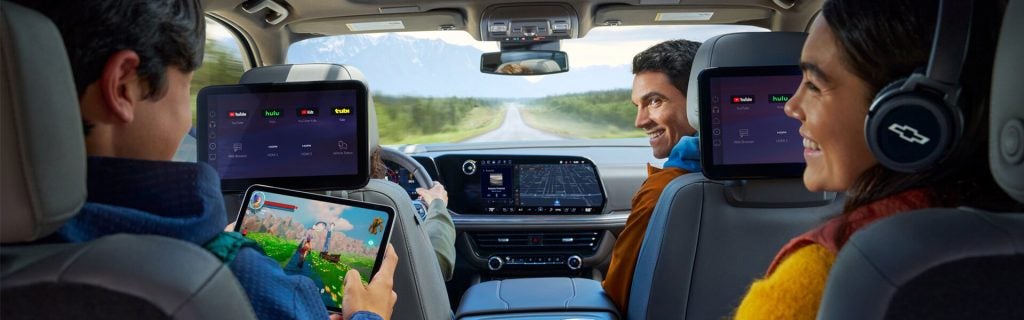
Chevrolet interior technology and center display

Technology should make your drive easier, not more complicated. That is one reason modern Chevrolet vehicles focus on practical tools drivers can use every day. From smartphone connectivity to helpful camera views, many Chevy technology features are designed to support commuting, parking, towing, family travel, and longer drives across Mississippi.

At Kirk Brothers Chevrolet of Vicksburg, shoppers can compare Chevrolet models with technology that fits the way they actually drive. Whether you are looking at a Silverado 1500, Equinox, Traverse, Trailblazer, Trax, Tahoe, or another Chevy model, the right features can make your next vehicle feel more comfortable and easier to use.

A Chevrolet Infotainment System Built Around Daily Use

A Chevrolet infotainment system should feel simple during the moments you use it most. That may include pulling up directions, answering a call, choosing music, checking vehicle settings, or using connected apps from the center display.

Many Chevrolet models offer touchscreen displays that place key controls within easy reach. Instead of digging through confusing menus, drivers can use a central screen to access audio, phone settings, navigation features, and available vehicle apps.

That matters during normal driving around Vicksburg. If you are heading to work, taking kids to practice, running errands, or driving toward Jackson or Tallulah, a clear infotainment setup can make the cabin feel more organized.

Smartphone Connectivity That Feels Familiar

One of the most useful Chevy technology features is smartphone connectivity. Many drivers already rely on their phones for directions, calls, messages, music, and podcasts. Chevrolet helps bring those familiar tools into the vehicle through available smartphone integration.

Depending on the model and equipment, drivers may be able to use Apple CarPlay or Android Auto compatibility to access supported phone features through the vehicle display. That can make everyday driving feel more natural because the apps and layouts are already familiar.

This is especially useful for commuters and families. You can start a route, make a hands-free call, or keep entertainment ready for a longer drive without constantly reaching for your phone.

Google Built-In and Connected Convenience

Some Chevrolet vehicles offer Google built-in, which can bring helpful Google apps and services directly into the vehicle’s center display. That may include access to Google Assistant, Google Maps, and other supported apps through the infotainment system.

For many drivers, this type of connected technology makes navigation and voice control feel more convenient. Instead of relying only on your phone, you can use built-in tools designed to work with the vehicle’s display and controls.

This can be helpful when you are traveling outside your usual routine. If you are driving from Vicksburg to another part of Mississippi, heading out on a road trip, or simply looking for a faster route, connected navigation can make the trip feel easier to manage.

Touchscreens That Help Keep Controls Clear

A good touchscreen is not just about size. It is about how easy the system is to read and use while parked or safely stopped. Chevrolet touchscreens often help organize common features in one place, which can reduce clutter inside the cabin.

Depending on the vehicle, shoppers may find large center displays, driver information screens, and customizable settings. These tools can help show important information without making the cabin feel overloaded.

For example, an SUV shopper may care about navigation and media controls for family travel. A truck shopper may care more about trailering information, camera views, or vehicle settings. The right display can support both needs in different ways.

Available Camera Views for Parking and Confidence

Camera technology is one of the most practical features for everyday driving. It can help when backing out of a driveway, parking near other vehicles, lining up a trailer, or navigating tight spaces.

Available Chevrolet camera systems may include rear camera views, surround-style views, or trailering-focused views, depending on the model and equipment. These tools can help drivers see more of the area around the vehicle.

That is helpful in a city like Vicksburg, where daily driving may include parking lots, narrow streets, boat ramps, school pickup lines, and busy shopping areas. A camera system does not replace careful driving, but it can make low-speed maneuvers feel more manageable.

Trailering Technology for Chevy Truck Drivers

For many Mississippi drivers, truck technology matters because towing is part of real life. Whether you tow a boat, trailer, camper, equipment, or weekend gear, Chevrolet offers available tools that can make trailering easier to manage.

Depending on the vehicle and equipment, available trailering technology may help with trailer profiles, pre-departure checklists, camera views, and other useful information. These features can be especially helpful for Silverado and Colorado drivers who use their trucks for work or recreation.

For shoppers comparing new Chevy trucks, technology should be part of the conversation. Towing capacity matters, but the tools that help you hitch, monitor, and maneuver can also make a major difference.

Driver-Assistance Features for Everyday Awareness

Chevy technology features are not only about screens and apps. Many Chevrolet vehicles also offer driver-assistance features designed to support awareness on the road.

Depending on the model and trim, shoppers may find features such as Forward Collision Alert, Automatic Emergency Braking, Lane Keep Assist with Lane Departure Warning, Following Distance Indicator, Front Pedestrian Braking, Rear Cross Traffic Alert, Blind Zone Steering Assist, or other available systems.

These features do not replace the driver. However, they can add helpful support during daily driving. That can matter in traffic, on highways, in parking lots, and during longer trips with family or passengers.

Technology That Helps Families Stay Comfortable

Families often care about technology in practical ways. They want charging access, simple phone pairing, easy climate controls, clear camera views, and entertainment options that make trips less stressful.

Chevrolet SUVs like the Equinox, Traverse, Tahoe, and Suburban can offer technology that helps with daily family life. Depending on the model, shoppers may compare available large displays, wireless smartphone features, USB ports, rear-seat reminders, camera views, and driver-assistance systems.

These details may seem small during a quick test drive. However, they can make a big difference after weeks or months of ownership. The easier the technology is to use, the more helpful the vehicle becomes during normal routines.

Technology for Commuting Around Vicksburg

Commuters often want features that save time and reduce frustration. A Chevrolet infotainment system with smartphone compatibility can help keep directions, calls, and audio simple. Available driver-assistance features can also help support awareness during heavier traffic or longer highway drives.

If you travel across Vicksburg, commute toward Jackson, or drive regularly through nearby communities, everyday tech can make your vehicle feel more useful. The goal is not to add features just for the sake of adding features. The goal is to choose a Chevy model with tools that fit your daily routine.

How to Compare Chevy Technology Features Before You Buy

The best way to compare Chevy technology features is to think about how you will use the vehicle.

Before your test drive, ask yourself a few simple questions:

  • Do I use my phone for navigation every day?
  • Do I need a larger touchscreen?
  • Would extra camera views help me park or tow?
  • Do I want available driver-assistance features?
  • Do I need family-friendly charging and connectivity?
  • Will this vehicle be used for commuting, travel, towing, or all three?

These questions can help you focus on the features that matter instead of getting distracted by technology you may not use often.

Test Drive Chevrolet Technology at Kirk Brothers Chevrolet of Vicksburg

Reading about technology helps, but using it in person is even better. A test drive lets you see how the Chevrolet infotainment system feels, how easy the touchscreen is to use, how the camera views work, and whether the available driver-assistance features fit your comfort level.

Kirk Brothers Chevrolet of Vicksburg can help shoppers compare new Chevy models and available technology features based on their daily driving needs. Whether you are looking for a truck, SUV, or commuter-friendly Chevrolet, our team can help you review the options that make the most sense.

Browse our expansive inventory of new Chevrolet vehicles Vicksburg, MS online, then visit Kirk Brothers Chevrolet of Vicksburg to compare Chevy technology features in person and schedule a test drive.


Posted in:

Related Posts

Chevy Transmission

Why Is Your Chevy Shifting Hard or Hesitating?

If your Chevy shifts with a jolt, pauses before moving, or changes gears when you do not expect it to, pay attention to when it happens. Those details can help a service advisor understand the concern. They cannot, by themselves, tell you whether the vehicle needs transmission fluid service, an adjustment, or a repair. What does the hesitation feel like? Before your appointment, note which of these descriptions fits your experience: Delayed engagement: After selecting Drive or Reverse, the vehicle pauses before it begins to move. A hard shift: A gear change feels like a pronounced bump or jolt. An unexpected shift: The transmission changes gears at a time that feels unusual for the speed or throttle input. A slipping sensation: Engine speed rises without the acceleration you expected. Tell the advisor whether it happens on the first drive of the day, after the vehicle warms up, while accelerating, on hills, or when slowing down. Note whether it happens every time or only occasionally. If a warning message appears, record its exact wording or take a photo when it is safe to do so. Also mention any recent service, towing, or fluid spots where you park. Can you tell the cause from the way it shifts? No single sensation points to one certain repair. Depending on the vehicle, a technician may need to consider fluid condition or level, a leak, electronic controls, or wear within the transmission. Engine performance can also affect how a vehicle feels during acceleration. The next step is to inspect the specific Chevy and review the symptoms before recommending work. That distinction matters when someone suggests a fluid change as an automatic fix for hard shifting. Transmission fluid service can be part of scheduled maintenance, but it may not resolve a separate fault. Likewise, an unusual shift does not automatically mean the transmission needs replacing. The vehicle’s year, model, maintenance history, and diagnostic findings should guide the recommendation. What happens during a service visit? Start by describing the symptom and when it occurs. A technician can review warning messages and diagnostic information, inspect for signs of a leak, check applicable fluid condition or level using the procedure for your Chevy, and test-drive the vehicle if appropriate. From there, the service team can explain what it found, what further testing may be needed, and whether maintenance or a repair is warranted. Your Chevrolet owner’s manual provides the maintenance guidance for your particular model. Arrange service soon for hard shifts or slow engagement. If the problem is getting worse, the vehicle struggles to accelerate, or you cannot select a gear, stop driving when it is safe and contact a service professional about the next step. Ask whether the Chevy should be towed rather than driven to the shop. Chevrolet gives similar urgency guidance for transmission concerns. For Chevrolet transmission service in Vicksburg, MS, contact the Kirk Brothers Chevrolet of Vicksburg service team and describe what you are experiencing. You can request a service appointment online so the team can inspect the vehicle before discussing a service or repair recommendation.

Chevy Oil Pressure Light

Oil Pressure Light On? What Chevy Drivers Should Do Next

If your Chevrolet oil pressure light comes on while you’re driving, find a safe place to pull over and shut off the engine as soon as you can. If the display says “Oil Pressure Low/Stop Engine,” do not keep driving or restart the engine to see whether the message disappears. Low oil pressure can damage the engine, even if the vehicle still seems to run normally. What to do when the oil pressure warning appears Pull over safely. Move out of traffic as soon as conditions allow and turn the engine off. Check the message and your owner’s manual. Wording and symbols vary by Chevrolet model. Follow any specific instructions shown on your vehicle’s display. Check the oil level when it is safe to do so. Follow the procedure in your owner’s manual, including its instructions for parking and waiting before checking. A low reading is useful information to share with a technician, but oil level alone cannot confirm that pressure has returned to normal. Arrange service before driving again. If the display says “Oil Pressure Low/Stop Engine,” leave the engine off and contact a service professional. Arrange a tow if the vehicle needs to be moved. Let the service team know exactly what appeared on the dash and whether you noticed a leak, unusual noise, or a recent oil change. Chevrolet notes that its oil pressure light may briefly illuminate at startup. The concern is a light that comes on while the engine is running or a low-pressure warning message. Consult your specific owner’s manual for the instructions that apply to your vehicle. Oil pressure warning or oil change reminder? These alerts call for different responses. “Change Engine Oil Soon” comes from the Oil Life System, which estimates when the oil and filter need replacement based on vehicle use. Schedule an oil change promptly. It is not the same message as “Oil Pressure Low/Stop Engine,” which calls for stopping safely and switching off the engine. The oil life percentage is also not a measurement of oil level or oil pressure. A recent oil change does not make a pressure warning safe to ignore, and an oil change reminder by itself does not tell you that pressure is low. Why continued driving can cause damage Engine oil must circulate under adequate pressure to protect moving parts. When pressure is too low, those parts may not receive the lubrication they need, and continued engine operation can cause serious damage. Low oil level is one possible factor, but a warning can require further inspection even when the dipstick shows oil. A technician can identify the cause instead of treating the dashboard message as a diagnosis. For routine maintenance, read about oil changes at Kirk Brothers Chevrolet of Vicksburg. If an oil pressure warning has appeared, contact our Chevrolet service team and explain the warning before bringing the vehicle in. You can also request a service appointment; arrange a tow when the vehicle should not be driven.

Charging 2027 Chevy Equinox

Can You Charge an Equinox EV at Home in Vicksburg?

Yes. You can charge an Equinox EV at home with compatible charging equipment and a suitable electrical connection. A standard household outlet can add charge slowly, while a properly installed Level 2 setup uses 240-volt power to charge faster. Which option fits your week depends on how far you drive, where you park, and the electrical capacity of your home. Our Blazer EV and Equinox EV comparison helps shoppers choose between the SUVs. Here is what charging an Equinox EV at home can look like after you bring one home. Standard outlet or Level 2: What changes? Level 1 charging uses a suitable three-prong, 120-volt household outlet and a compatible charge cord. It adds range gradually, so it may help you top off after short drives or when you have plenty of time parked at home. If you regularly drive longer distances, relying on a standard outlet alone may leave you needing more charging time than your schedule allows. Level 2 charging uses a suitable 240-volt outlet and compatible equipment or a professionally installed, hardwired home charger. It charges faster and is often more convenient when you need to replace a typical day’s driving overnight. Actual charging speed depends on the equipment, the vehicle’s charging capability, settings, and battery conditions. Check which charging cord or wall unit comes with, or is available for, the Equinox EV you are considering; do not assume one is included. What should you check before installing home charging? Start with where the Equinox EV will park. The charging cable needs to reach the vehicle comfortably without stretching across a walkway or relying on an extension cord. Then ask a qualified electrician to assess the outlet or proposed charger location, available electrical capacity, circuit and panel, and whether wiring or other work is needed. For a Level 2 installation, ask for a quote that covers the charger or outlet, labor, and any applicable permit requirements. If you rent or live in a property with shared parking, discuss installation approval with the property owner or manager first. Chevrolet advises having a qualified electrician verify that an outlet and electrical system are suitable for EV charging. Its guidance also says not to use extension cords, power strips, or similar devices between the wall and charging cord. Installation needs vary by home, so an electrician can tell you what your particular setup requires. How could charging fit into a normal week? Suppose you drive around Vicksburg on weekdays and make a longer trip on Saturday. You could plug in when you get home on the nights you need a top-up, then check the Equinox EV’s displayed charge and estimated range before the weekend. If the longer drive needs more energy than a standard outlet can add in time, plan for Level 2 home charging or a suitable public charging stop. The vehicle’s Charging app lets you choose when charging begins, set a target charge level, and create a home schedule. That makes it easier to plan around departure times or an electricity rate that varies by time of day, if your utility offers one. You do not have to run the battery down before plugging in. Revisit your routine as you learn how your commute, weather, and trips affect the range you see. Have questions about charging equipment on a particular vehicle? Browse new Chevrolet inventory at Kirk Brothers Chevrolet of Vicksburg and ask our team to walk through the Equinox EV’s charging settings and compatible home options with you. Suggested image alt tags “Chevrolet Equinox EV plugged into a home charging station” “Equinox EV charging cord connected to a suitable household outlet” “Wall-mounted Level 2 charger next to a parked Chevrolet Equinox EV” “Charging schedule displayed on a Chevrolet Equinox EV center screen” Match each alt tag to the actual photo and charging equipment shown.